
Child Projects & Relationships
EntryLayer supports parent-child project structures for business processes that need related records, nested work, or multi-table Snowflake sources.
When to use this guide
Section titled “When to use this guide”Use this guide when you need to:
- model parent and child records
- understand generated relationships from Snowflake structure
- create builder-managed relationships
- configure join key mapping
- work child records inside Submission Detail
What a child project is
Section titled “What a child project is”A child project is a full EntryLayer project linked to another project.
| Concept | Meaning |
|---|---|
| Parent project | Higher-level business record. |
| Child project | Related detail records with their own fields, records, and behavior. |
| Relationship | The configured link between parent and child records. |
| Root project | Main entry point for a related project hierarchy. |
A child project is different from a simple repeating section because it remains its own project with its own permissions and workflow.
Relationship creation paths
Section titled “Relationship creation paths”| Path | When to use |
|---|---|
| Generated from Snowflake structure | Use when related tables or semantic metadata already describe the hierarchy. |
| Builder-managed in Form Editor | Use when builders need to create, link, or adjust relationships manually. |
| SQL API management | Use when Cortex/admin automation should configure relationships from documented contracts. |
Generated relationships
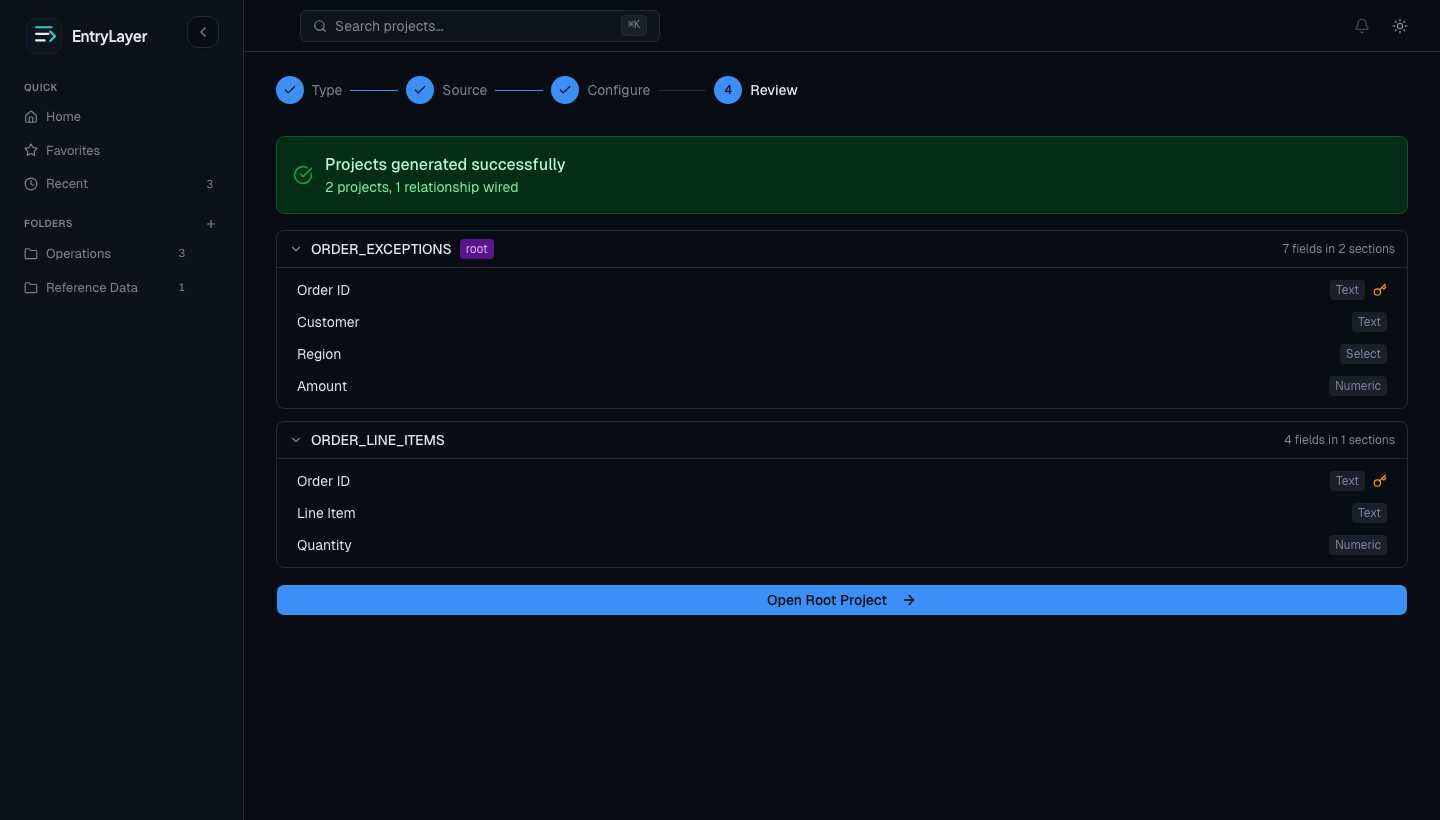
Section titled “Generated relationships”When creating projects from related Snowflake objects, EntryLayer can detect relationships and let users review:
- which tables become projects
- which project is the root
- which relationships will be created
- how the generated structure appears before publication
Generated relationships should remain metadata-driven and should not require source row sampling during setup.
Builder-managed relationships
Section titled “Builder-managed relationships”Builders can manage relationships in Form Editor.
They can:
- create a new child project
- link an existing project as a child
- remove a relationship
- manage join key mapping
Join key mapping
Section titled “Join key mapping”Each relationship needs a way to connect parent and child records.
Builders choose:
- the parent field used as the key
- the child field used as the matching key
Stable primary keys and field ids matter because relationship behavior depends on reliable matching.
Submission Detail behavior
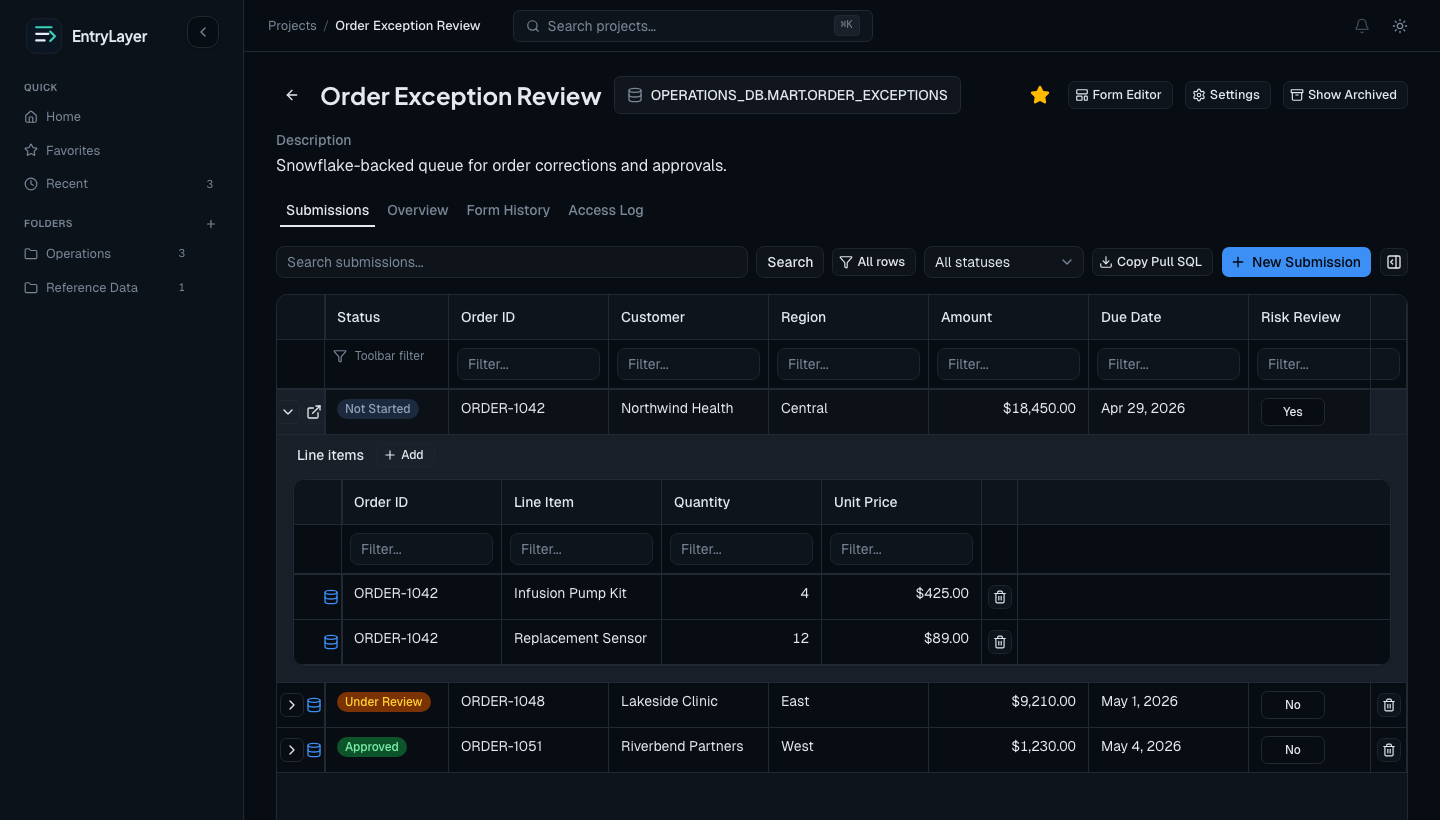
Section titled “Submission Detail behavior”Inside a parent submission, users can:
- see related child records
- open existing child records
- create new child records from the parent context
- move through nested operational structures without leaving the broader workflow
Save-first parent behavior
Section titled “Save-first parent behavior”When users create child records from a new parent record, the parent usually needs to be saved first so the child relationship has a stable key to attach to.
This prevents orphaned child records and keeps the hierarchy structurally sound.
Permission implications
Section titled “Permission implications”Relationships do not erase normal access checks.
| Layer | What still applies |
|---|---|
| Parent project permissions | Control parent visibility and actions. |
| Child project permissions | Control child visibility and actions. |
| Field-group restrictions | Can hide or lock fields. |
| Snowflake source access | Can still affect source-backed rows and values. |
Practical workflow
Section titled “Practical workflow”- Decide which project is the root.
- Create or review relationships from source structure or Form Editor.
- Confirm join key mapping.
- Publish form changes.
- Open a parent submission.
- Create or work child records inside the parent context.